

How To Enroll Sign up or make changes to your benefits
The UNITE HERE Local 11 Health Benefit Fund strives to make signing up for benefits as easy as possible. Newly eligible participants can enroll anytime; currently enrolled participants can make changes during the annual open enrollment period.
- Enrolling for the first time
- Making changes to your benefits
- Choosing a medical plan and other benefits
Enrolling for the first time
The UNITE HERE Local 11 Health Benefit Fund has ANYTIME enrollment for newly eligible participants. You do not need to wait for the annual open enrollment period to enroll. Once you receive notice from the Fund that you are eligible, you can log in to the secure Member Portal and enroll in the benefits you are eligible for.

When you log in to the Member Portal, ONLY the plans you are eligible for will be available for you to select. See the Summary Plan Description for eligibility rules.
Step 1: Log in to the Secure Member Portal.
Step 2: Once you have logged in, click the Elections tab in the menu bar.
Step 3: Select Change My Election
Step 4: Check the box next to “I would like to make changes to my current election” and click Change My Election to begin the enrollment process.
The system will guide you through selecting your benefits and enrolling your dependents (if any).
Note: If you are enrolling dependents, you will need to provide required supporting documentation (including a marriage certificate for a Spouse; a Declaration of Domestic Partnership form for a Domestic Partner; and birth certificates for Dependent children).
If you do not have access to the internet or need assistance you can come into the Benefits Administration Office, and the Member Services team can help you fill out your forms online. You can also call the Member Services team, and they will assist you over the phone.
Benefit Administrative Office
UNITE HERE Local 11 Health Benefit Fund
1122 W. Washington Blvd, Suite 300
Los Angeles, CA 90015
Phone: (866) 345-5189
Making changes to your benefits
If you are already enrolled in benefits, you can make changes during the Fund’s open enrollment period during the fall.
Open Enrollment is your annual opportunity to assess your current benefits and make any necessary changes to make sure your selection meets your needs. Whether you’re considering changing your medical plan or enrolling or disenrolling dependents, this is the time to make those adjustments, if you are eligible to do so.
If you don’t want to make changes, no action is required. Your current coverage will continue as long as you are eligible.
You can login to see your current benefits anytime by visiting the Secure Member Portal.
Choosing a medical plan and other benefits
Medical benefits are offered to all eligible and enrolled employees and their dependents. Your choice of medical plan is dependent on your months of continuous coverage and how far you live from the Martin Luther King, Jr. Community Hospital.
When you log in to the Member Portal, ONLY the plans you are eligible for will be available for you to select. See the Summary Plan Description for eligibility rules.
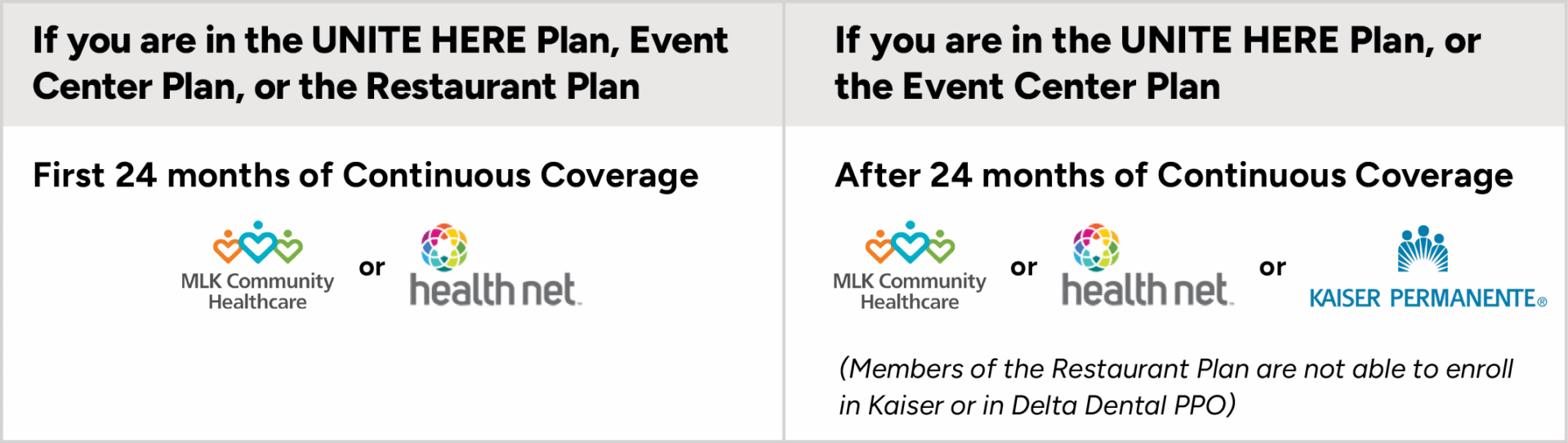
You are not allowed to disenroll
Once you enroll, you are not allowed to disenroll from (or drop) medical coverage. You will have medical coverage from the Fund as long you work enough hours to earn eligibility, and your enrolled dependents will lose coverage only if they no longer satisfy the definition of “Dependent” (for example, if you get divorced, your former spouse would no longer qualify as your dependent) or if you do not work enough hours to maintain your eligibility. The only exception to this rule involves the situation where you, the participant, are eligible for Medicare and want Medicare to be your primary health benefit.
Choosing other benefits
When you become eligible, the Fund will notify you and automatically enroll you in Life Insurance and Accidental Death & Dismemberment benefits.
You will be automatically enrolled in prescription and vision coverage when you enroll in medical coverage. To enroll in dental coverage, you must select one of the options available to you when you log in to the secure Member Portal.
Choosing other benefits
When you become eligible, the Fund will notify you and automatically enroll you in Life Insurance and Accidental Death & Dismemberment benefits.
If you are eligible for prescription, dental and vision coverage, these will be available to you to select when you log in to the secure Member Portal.